Course Overview
Applied Imaging and Applications to the World Wide Web I
ART 221 – CGI 221 – Thursdays, 6:00 PM – 9:30 PM
Applied Imaging and Applications to the World Wide Web I
Concepts and techniques underlying the World Wide Web. Image processing and two-dimensional graphics as methods to produce material for the World Wide Web. Emphasis on the artistic, mathematical, and computer science underpinnings of these topics. PREREQ: ART 112.
Instructor: Livia Nieves, Adjunct Professor, Art Department
E-mail: livia.nieves@cuny.edu
Online syllabus at Brightspace
Applied Imaging and Applications to the World Wide Web I introduces students to the visual, technical, and conceptual foundations of modern web design. This course emphasizes how design decisions translate into effective digital experiences across devices, platforms, and audiences.
Students will learn how to plan, design, and present a complete client-ready design package for a promotional web page. The course focuses on visual communication for the web, including layout, color, typography, imagery, and branding, while also introducing the technical basics needed to bring designs to life.
What You’ll Learn
- Core principles of visual design for the web, including hierarchy, balance, contrast, and usability
- How to design responsive layouts that adapt seamlessly to mobile, tablet, and desktop screens
- Strategic use of color, typography, and imagery to support branding and user engagement
- Web-optimized image creation using Adobe Photoshop and InDesign
- Best practices for designing promotional pages that support marketing goals
Applied Projects
This course is highly project-based and is structured to mirror real-world creative and client-facing workflows. Students will move through the full design process—from concept development and visual research to layout design, refinement, and presentation—while building a cohesive promotional design system.
Midterm Project – Client Design Package part 1 (Desktop Focus) Using Photoshop
For the midterm, students will design a responsive homepage design package for a fictional or assigned client using Adobe Photoshop. The emphasis will be on the desktop layout, allowing students to explore visual hierarchy, grid systems, typography, color strategy, and imagery at a larger scale. Students will present their work as a professional client-facing design proposal that clearly communicates intent and design decisions.
Final Project – Client Design Package part 2. Using Photoshop and Canva
(Mobile Devices Focus + Social media assets)
The final project continues and expands the midterm design package by refining and adapting the layout for multiple screen sizes. Students will apply responsive design principles to create optimized layouts for:
– Laptop screens
– Tablet devices
– Mobile devices
Social Media Marketing Assets
In addition to web layouts, students will design a coordinated set of social media marketing graphics that extend the client’s brand beyond the website. These assets include:
– Organic social media posts
– Paid advertising graphics
– Social media profile images and cover graphics
Together, these deliverables reinforce visual consistency, branding, and marketing strategy across digital platforms, preparing students for real-world design expectations.
The final project will be delivered as a polished, professional presentation created in Canva. This presentation will showcase the complete visual system for the project, including the web design developed for the midterm and all social media assets created for the final. The deck will be structured to clearly present the design concept, visual consistency, layout decisions, and final executions, simulating how work is presented to real clients or creative directors.
Assignments
Every week, you’ll receive an assignment. The assignments will be posted on Brightspace or announced in class. Every week, Dropbox links should be posted to Brightspace class homework so it can be marked completed.
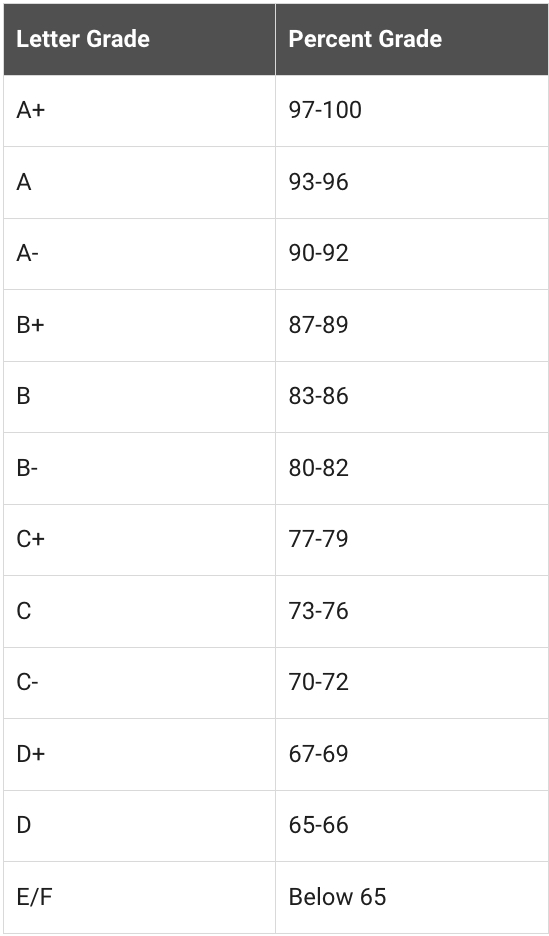
Failure to complete assignments and in-class exercises will result in a maximum grade of 70% (C-). Strong performance on all major projects—including the midterm design package and final web page—is required to pass the course. Low project grades, combined with poor attendance, significantly increase the risk of failing.
Excessive absences may result in failure of the course, even if all projects are completed at a high level.
Course Format
This is a synchronous online course, meaning students must attend live Zoom sessions at scheduled times. Classes include lectures, demonstrations, design critiques, and discussions. Students are expected to actively participate and stay engaged throughout each session.
Course Platforms & Required Applications
To successfully participate in this course, students must regularly use the following CUNY-supported platforms. Clear organization and consistent use of these tools are essential.
Brightspace (Learning Management System)
Brightspace is the official Learning Management System (LMS) for this course and will serve as the central hub for:
– The course syllabus
– Weekly assignments and deadlines
– Exams, quizzes, and course announcements
– Lecture materials and resources
Synchronous Course Format
This course is synchronous, meaning students are required to be virtually present at the scheduled class time. Although the course is online, classes meet live and in real time.
Students are expected to:
– Attend class on time
– Sign in to Brightspace during class meetings
– Actively participate in lectures, presentations, and class discussions
Zoom (Virtual Class Meetings)
Zoom will be used for all live class sessions.
Important Zoom Requirements:
– You must log in using your CUNYfirst Zoom account
– Do not use a personal Zoom account
– Use the following format when signing in: firstname.lastname#@login.cuny.edu
Attendance is recorded through Zoom and monitored throughout each session.
I will also take old school attendance at 6:08 pm. I will call your name and expect to hear your voice answering.
Asset Delivery + Sharing Files
Dropbox (Cloud Storage & File Sharing)
Dropbox is an essential tool for this course and will be used to:
– Share and submit homework assignments
– Upload class exercises and project files
– Review instructor feedback
Dropbox Setup Instructions
- Activate your CUNY Dropbox account if you have not already done so.
- If you encounter any issues with your Dropbox account, please let me know or send an email to helpdesk@lehman.cuny.edu or by telephone at 718-960-1111
- Here’s a QuickTime Video on how to upload your homework and class exercises.
Proper file organization is required and will support efficient reviewing, grading, and long-term project development.
Adobe Creative Cloud
You do not need to pay for Adobe.
Our course qualifies for free access on a semester-by-semester basis.
As soon as the Adobe licenses are available, I will inform you.
Video tutorial on how to access your Adobe account once you have received access: https://youtu.be/xu18JUsCxck
System Requirements for Adobe Software and Online Learning
Your computer should be in proper shape for this course. Your internet service should be steady and reliable to ensure smooth downloads and uploads of large files. Consistent connectivity is crucial for participating in live sessions and accessing online resources without interruptions. Please review this PDF for specs.
Lending Equipment
First-come, first-served applies to this service.
You cannot take this course on a Chromebook, a tablet, or even an old laptop.
This course requires the right equipment. It will be impossible to run the necessary software and meet the course requirements without a suitable computer. PDF for specs.
Grading Policy
31% Participation, assignments, class exercises, quizzes, and attendance
29% Midterm
Client Design Package part 1 (Desktop Focus)
40% Final project
Client Design Package part 2
(Mobile Devices Focus + Social media assets)If you do not complete your assignments and class exercises, you will receive a grade of 70% (C-) only if* you obtain an A grade on each of your projects, the midterm design package, and the final web page. The lower your project grades are, the greater your chances of failing the course, especially if you are not attending class regularly.
The final project will be delivered as a polished, professional presentation created in Canva. This presentation will showcase the complete visual system for the project, including the web design developed for the midterm and all social media assets created for the final. The deck will be structured to clearly present the design concept, visual consistency, layout decisions, and final executions, simulating how work is presented to real clients or creative directors.
Despite submitting perfect projects, excessive absences will result in failing the course.
Office hours
Please request a private Zoom tutoring session at least two days in advance via email: livia.nieves@cuny.edu.
Online attendance policy
The student handbook notes that “Students are expected to attend all class meetings as scheduled and are responsible for all classwork missed because of late registration or absence. Excessive absences in any course will result in failing the course.”
If you miss more than three classes, please withdraw from the course as soon as possible.
**You will receive a WU grade if you have excessive absences and do not drop the class.
When a student misses three or more meetings in a once-per-week course, it’s considered excessive absences. Therefore, it is critical to attend all classes to ensure a successful outcome. Students are allowed to miss one or two classes max. If you are absent, please send an email as soon as possible. Assignments must be submitted by the following week unless the instructor grants an extension.
Online class meeting at 6 PM.
Zoom records attendance. Detailed reports show when users enter and exit the app.
Similarly, if your connection goes down and you have to re-log in, that will be recorded.
I will also take old school attendance at 6:08 pm. I will call your name and expect to hear your voice answering.
Updated Student Guidelines
New deadline for “Withdrawal” (W) Grade
The deadline to withdraw from a course with a “W” grade has been changed. During the pandemic, the deadline was extended to the last day of the semester to allow students more time to withdraw. As of Fall 2024, the new deadline will be the 60% point of the Fall semester and future semesters moving forward. For Fall 2024, the new deadline will be Wednesday, November 6th
WU Grades – A grade of “WU” is assigned to students who participated in an academically related activity at least once, completely stopped participating in academically related activities any time before the culminating academic experience of the course, and did not officially withdraw.
Camera Use Guidance for Online and Hybrid Courses (documentation)
We can now require the use of cameras for online and hybrid classes, but this must be clearly stated in the syllabus and during the first meeting of the semester. This gives us the flexibility to use it when we feel the need for it. Here are the pertinent guidelines: PDF
New Academic Integrity Statement that Incorporates AI
In June 2024, the CUNY Board of Trustees passed a new/revised academic integrity statement that incorporates when/how the use of AI may violate academic integrity. See attached policy – PDF
Campus referrals for students
The Lehman College Mental Health Committee seeks to create a campus community of students, staff, and faculty sensitive to Lehman students’ mental health needs and emotional well-being. It wants to ensure student success, persistence, retention, and graduation, responsively and increase awareness and access to mental health services on campus. Please use this referral sheet for on-campus services. CAMPUS – PDF
Accommodating disabilities
Lehman College is committed to providing access to all programs and curricula to all students. Students with disabilities who may need classroom
accommodations are encouraged to register with the Office of Student Disability Services. For more information, please contact the Office of Student Disability Services, Shuster Hall, Room 238, phone number 718-960-8441.
The Academic Center for Excellence (ACE) and the Science Learning Center (SLC) are two of the tutoring centers on campus. The ACE provides appointment-based and drop-in tutoring in the humanities, social sciences, and writing, as well as general writing and academic skills workshops. The SLC provides drop-in tutoring for natural and computer science courses. To obtain more information about the ACE and the SLC, please visit their website at
http://www.lehman.edu/issp, or please call the ACE at 718-960-8175, and the SLC at 718-960-7707.